Mainline

Continuous delivery, without the ticket admin.

Mainline keeps the parts of project management that help a team ship as fast as the code arrives, and drops the rest. The flow from plan to production stays visible, whoever or whatever writes the code.

Open source, AGPLJira import and exportAgents connect over MCP

How Mainline works
01

Enforced WIP limits

One story per person by default. Raising it needs a reason.

02

Separate deploy and release

Ship code any time, and choose when users get it.

03

Forecasts from real delivery

Put the time into better stories. Forecasts are for the whole team, and everyone sees them.

04

Ticket factories stay in Jira

Flags ticket-speak, for better tests and safer agent work.

05

One shared view of delivery

The whole team owns delivery and sees the same views.

06

Acceptance scenarios approved by your team

Read-only for agents. Your team approves them and checks them off.

Coding agents

Safer delivery with coding agents

Coding agents write code quickly. The risk is in what gets merged and released. Mainline keeps changes small and verifiable.

  1. 1Each story has acceptance scenarios written by your team.
  2. 2Agents connect over MCP, read one story, automate its scenarios and build until they pass.
  3. 3Every change goes to main in a small increment, behind a flag if it is unfinished.
  4. 4Deploy and release are separate steps, so code can be live and switched off.

By default, every story is paired on or walked through live with a second person before it's released.
A pull request approved by passing it through an LLM and back does not count as a second person.

One story at a time, with a person deciding what correct means.

PLAN

Guests can check out without an account

Scenarios · written by Carol
GIVEN
I have items in my basket and no account
WHEN
I check out as a guest
THEN
I can place the order with only my email address
GIVEN
I placed an order as a guest
WHEN
I later open an account with the same email address
THEN
that order is in my order history
● Read by a coding agent over MCP
DEPLOYRELEASErelease is a person's decision

The product

Built for continuous delivery

Most project tools make it easy to start work and hard to finish it. Mainline does the opposite: one story at a time, small releases, nothing piling up unseen.
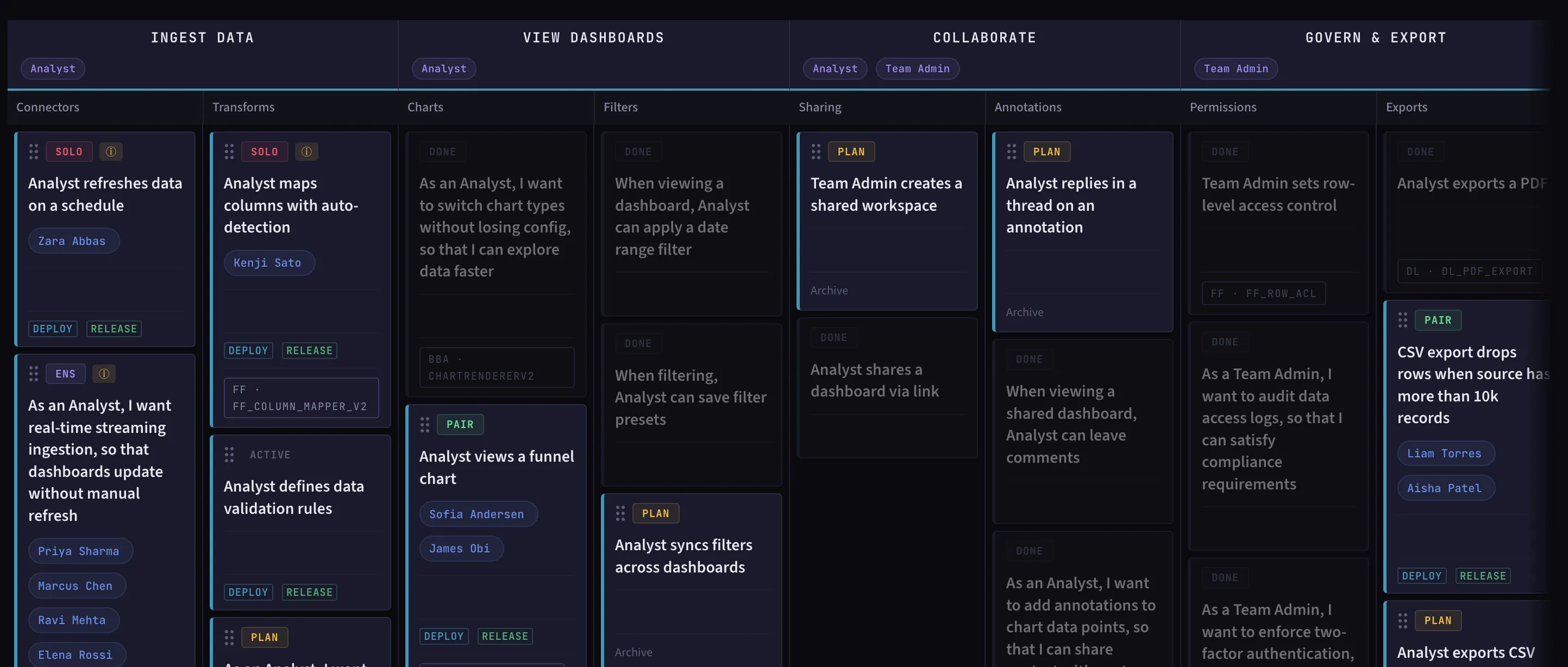
A story map: activities across the top, steps beneath them, stories in release slices

A story map in place of a backlog.The whole product on one screen, sliced into releases. Nothing hides in a list.
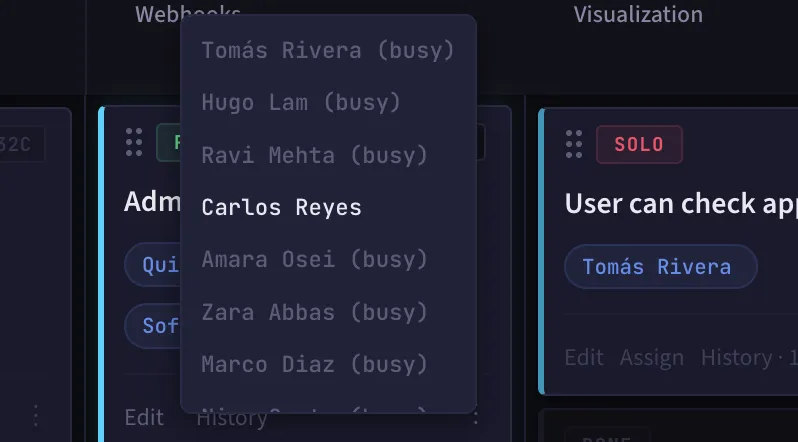
Assigning a story to a person

One active story per person

Enforced by the system. A team can raise its limit, and the change is an event everyone sees. Several people can share a story when pairing.
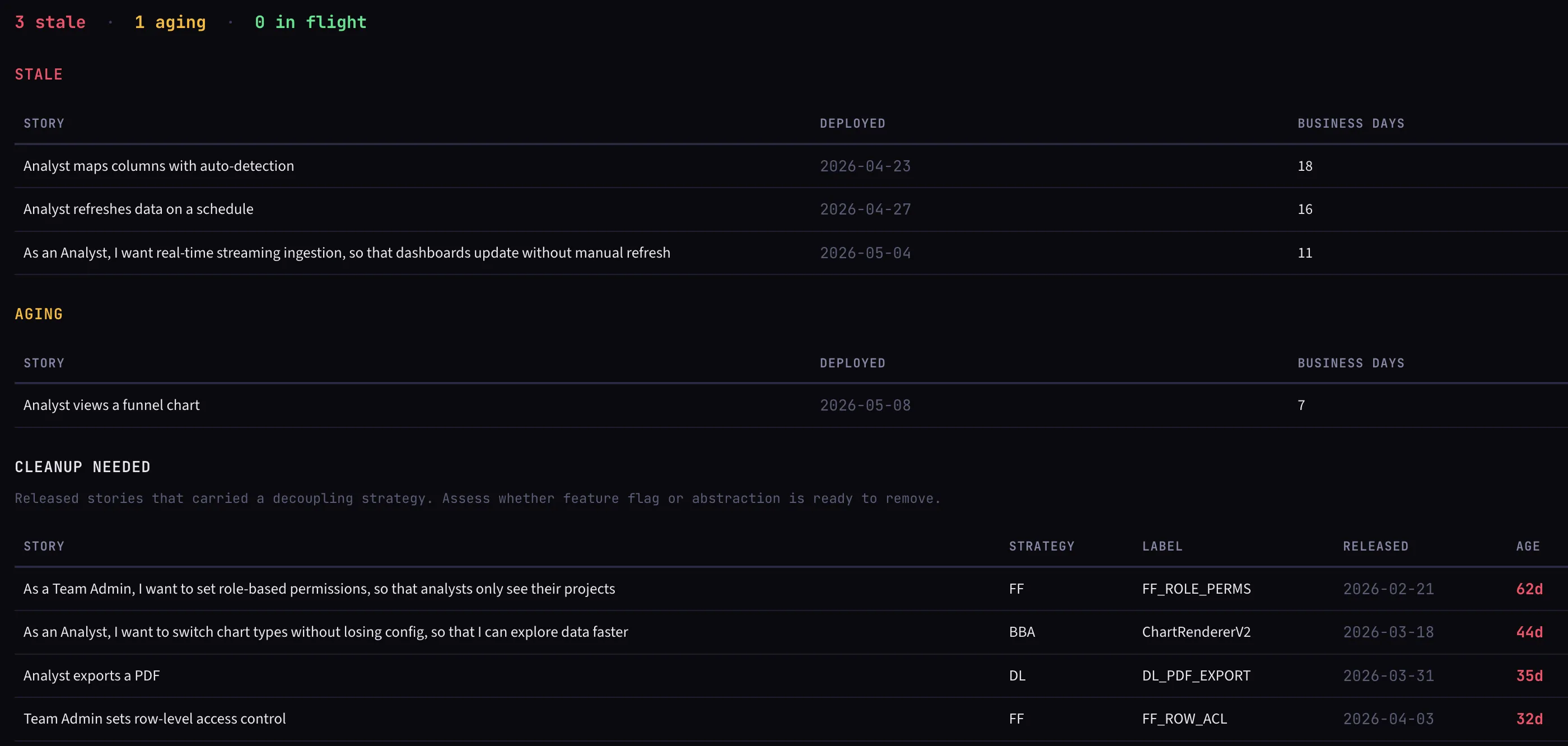
The inventory of unreleased work

Inventory

How many finished features are deployed and invisible to your users right now? The inventory shows unreleased work and stale feature flags. If users don't have the feature, it is not done.
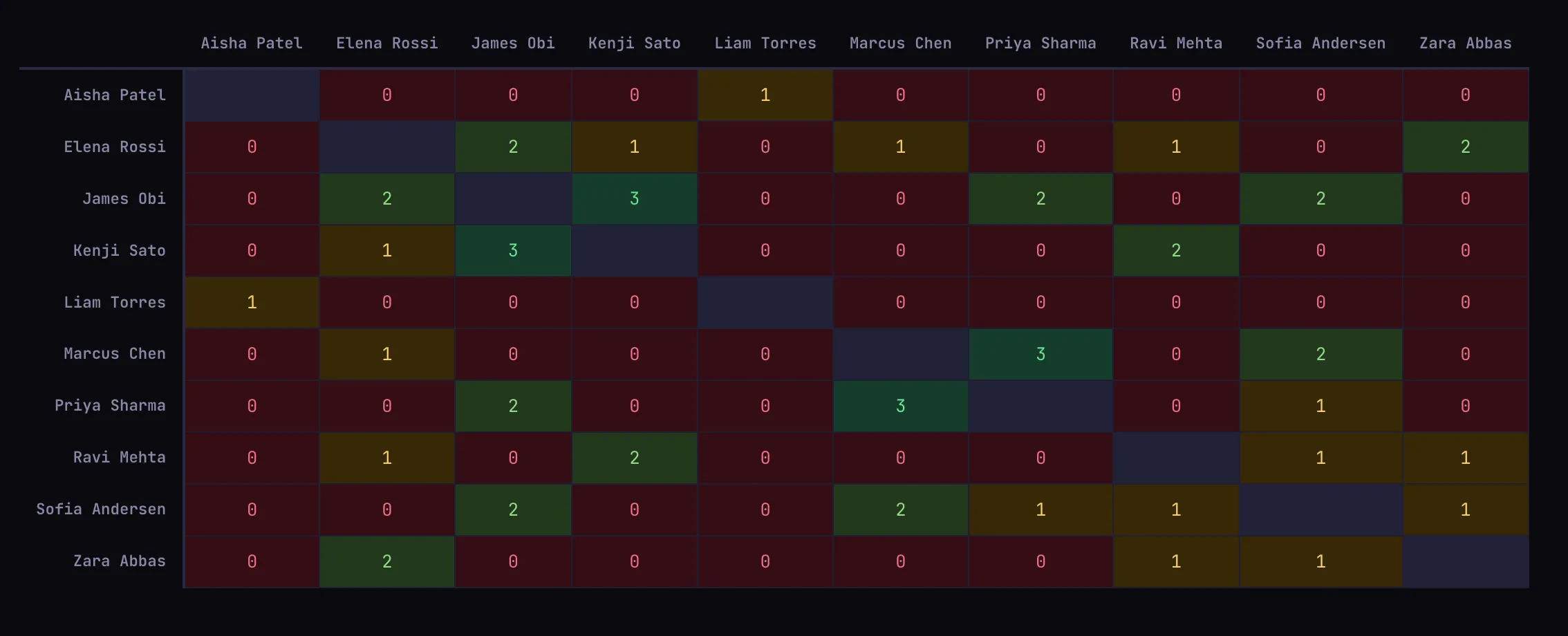
The pairing matrix

Pairing matrix

Who works with whom, including which stories an agent has read.
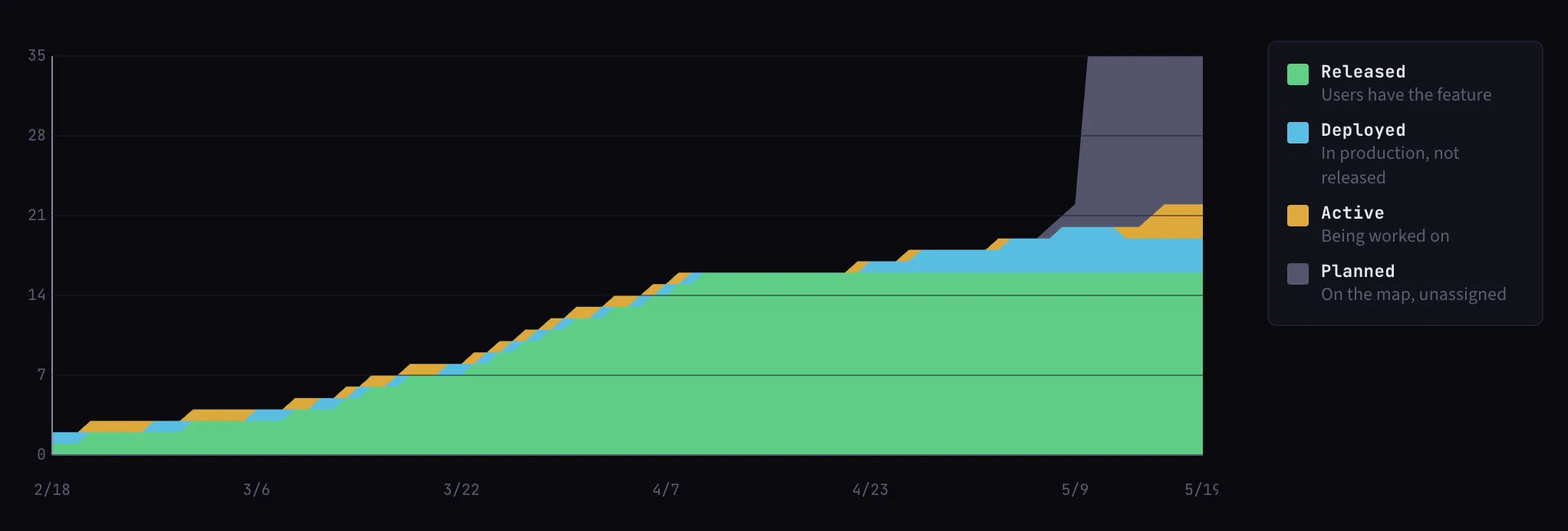
A cumulative flow chart

Every change is an event

Cumulative flow for the team, and no individual metrics.

Fit

What Mainline doesn't have

  • A backlog. Work is on the map, or frozen in the Ticket Museum until someone pulls it.
  • Story points or sprints. Progress is what's in users' hands.
  • Individual metrics. Every view belongs to the team, and everyone sees the same ones.
  • Sub-tasks. A story is the smallest thing users get. How the team splits the work is up to them.

Don't use Mainline if

  • You report story points, sprints or velocity upward, and that can't change.
  • You want to measure or compare individual people, or track their hours.
  • Each person needs several stories open at once.
  • Your work is mostly support tickets or operations. Mainline tracks product work.
  • You need custom fields, workflows or permission schemes.
  • You release a few times a year and aren't trying to change that.

From Jira

Bring your Jira backlog. Keep what's worth building. Take it anywhere.

  1. 1Import. A Jira CSV export comes in frozen and searchable. No API keys, and your Jira is untouched.
  2. 2Clean up. Promote only what you'd actually build, one story at a time, each with its acceptance scenarios.
  3. 3Carry on here, or export. Stay in Mainline and connect your coding agent over MCP. Or download the cleaned stories, in order, with a feature file for each, and hand them to your agent or load them back into Jira.
Jira typeFrozen backlogWhen promoted
StoryAs isA story on the map
BugLabelled "bug"A story on the map; urgent ones are worked next
TaskLabelled "task"A story only if users get something from it; otherwise folded into the story it serves
Sub-taskKept with its parentStays in the museum with its parent; never its own card
EpicA filter and groupingStays in the museum; promote its tickets instead
SpikeLabelled "spike"A small, time-boxed story whose output is a decision

Self-host or hosted

The same product, run by you or by us

Self-hosted

Free
Licence
Open source, AGPL
Setup
Docker Compose and your own mail server
Updates, backups
You
Jira import
Yes
Your data
Never leaves your servers
Team size
Any

Hosted

$99per team, per month
Licence
Same code, run by us
Setup
Sign up
Updates, backups
Us
Jira import
Yes
Your data
Stored by Mainline
Team size
Max 12 people per team

06 · Free tools

Is your team really integrating?

The CI Monitor shows branch age across every repository in your GitHub org. One-click install, free. The Flow Simulator shows what work in progress does to delivery, in your browser.
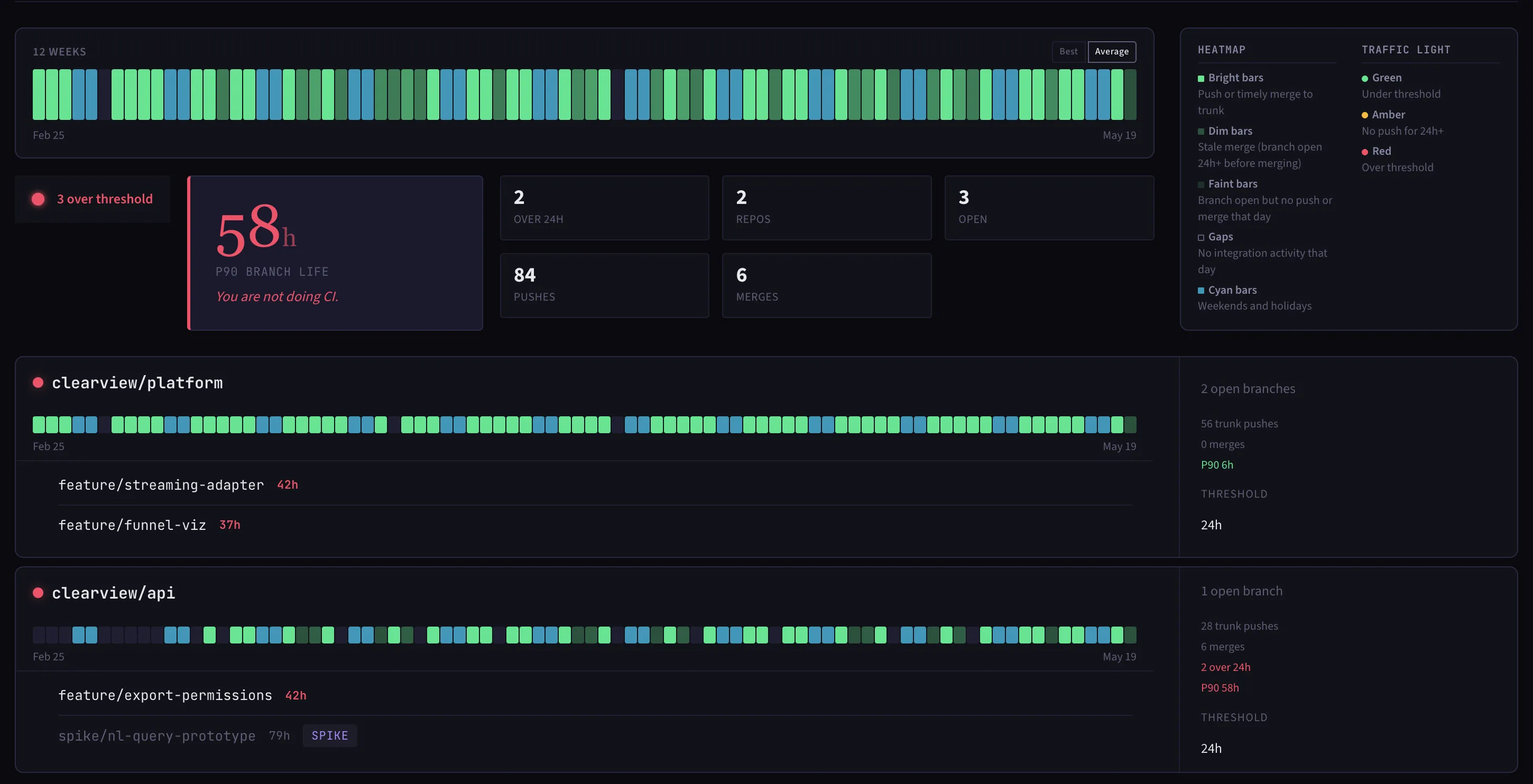
CI Monitor showing branch age across repositories

Import your Jira ticket pile and keep only what's worth building.